Please note - This article isn't fully reviewed. Code snippets may have errors or may be missing global veriables.
For those that go to the same school as I do, you know that pronto is the main platform that we use to talk. Interestingly, unlike other platforms, Pronto doesn't disallow selfbotting, they only don't want you to spam requests. This makes us free to write our own bots, without the risk of being removed.
For the purposes of this tutorial, I will be using python, although you could theoretically use any language that supports interfacing with chrome devtools. The selenium package in python just makes it super easy, that is why I chose it.
You also don't really need to even run a browser, I just found it handles some things like authenticating to pusher, which just makes my work easier.
Prerequisites
1) Python installed on path
2) Chrome installed
3) Selenium installed with chrome webdriver
Step 1: Setup selenium
To start, you will need to import selenium:
from selenium import webdriver
from selenium.webdriver.chrome.options import Options
Define variables:
driver = None
websocket_request_id = None
You will want to setup chrome now:
def setup_chrome():
    # Setup persistent profile
    profile_dir = os.path.join(os.getcwd(), 'chrome_profile')
    os.makedirs(profile_dir, exist_ok=True)
    chrome_options = Options()
    chrome_options.add_argument(f'--user-data-dir={profile_dir}')
    chrome_options.add_argument('--profile-directory=Default')
    chrome_options.set_capability('goog:loggingPrefs', {'performance': 'ALL'})

    # Start chrome with network watching
    driver = webdriver.Chrome(options=chrome_options)
    driver.execute_cdp_cmd('Network.enable', {})
    driver.get('https://[pronto subdomain name here].pronto.io/recents/chatid') # Replace chatid with the ID of the bubble. To get this ID, open the chat in pronto and get the number at the end of the URL.
Then the main loop function:
def run():
    try:
        while True:
            # Do nothing for now
            time.sleep(0.05)
    except KeyboardInterrupt:
        print("stopping...")
    finally:
        if driver:
            driver.quit()
        print("Browser closed")
Step 2: Handle websockets
Start by creating a function to handle traffic:
def capture_websocket_traffic():
    global websocket_request_id
    logs = driver.get_log('performance')
    for entry in logs:
        try:
            log = json.loads(entry['message'])
            message = log.get('message', {})
            method = message.get('method', '')
            params = message.get('params', {})

            if method == 'Network.webSocketFrameReceived':
                payload = params.get('response', {}).get('payloadData', '')
                print(f"[RECEIVED] {payload}")

                handle_event(payload)
            elif method == 'Network.webSocketFrameSent':
                payload = params.get('response', {}).get('payloadData', '')
                print(f"[SENT] {payload}")
            elif method == 'Network.webSocketCreated':
                url = params.get('url', '')
                websocket_request_id = params.get('requestId')
                print(f"WebSocket opened: {url}")

            elif method == 'Network.webSocketClosed':
                print(f"WebSocket closed")
                websocket_request_id = None

        except Exception as e:
            pass
def handle_event(payload):
    # Do handling here
Add to main loop:
        while True:
            capture_websocket_traffic()
            time.sleep(0.05)
Step 3: Sending requests to Pronto API
Create a function to send web requests through devtools:
def make_cdp_request(url, method='GET', headers=None, post_data=None, timeout=30):
    # Injects javascript into the browser to send web requests
    script = """
    const callback = arguments[arguments.length - 1];

    fetch(arguments[0], {
        method: arguments[1],
        headers: arguments[2],
        body: arguments[3],
        credentials: 'include'
    }).then(response => {
        return response.text().then(text => {
            callback({
                status: response.status,
                body: text
            });
        });
    }).catch(error => {
        callback({error: error.toString()});
    });
    """

    if headers is None:
        headers = {}

    try:
        driver.set_script_timeout(timeout)
        result = driver.execute_async_script(script, url, method, headers, post_data)

        if 'error' in result:
            print(f"Request failed: {result['error']}")
        else:
            print(f"{method} {url}; Status: {result['status']}")

        return result
    except Exception as e:
        print(f"Error: {e}")
        return {'error': str(e)}
To start off, we can create a basic function to send a message on pronto:
def send_msg(msgcontent, channelid):
    result = make_cdp_request(
        'https://[pronto subdomain name here].pronto.io/api/v1/message.create', # Replace [pronto subdomain name here] with the subdomain of your pronto organization
        method='POST',
        headers={'Content-Type': 'application/json', 'Authorization': 'Bearer [YOUR SESSION TOKEN HERE]'}, # Replace [YOUR SESSION TOKEN HERE] with your session token. To get your session token, click on any chat in your pronto while you have the "Network" tab open in your browser. Then, click on the bubble.history request, expand request headers section, and look at the Authorization header.
        post_data=json.dumps({
            "id": None,
            "uuid": str(uuid.uuid4()),
            "bubble_id": channelid,
            "message": msgcontent,
            "created_at": datetime.now().strftime("%Y-%m-%d %H:%M:%S"),
            "user_id": 6889624,
            "messagemedia": []
        })
    )
    return result
Step 4: Expand!
To add a "command trigger" to a pronto chat, edit the handling function:
def handle_event(payload):
    pljs = json.loads(event_data)
    if (pljs["event"] == "App\\Events\\MessageAdded"):
        BBL = json.loads(pljs["data"])["message"]["bubble_id"]
        if BBL == yourchannelid: #replace yourchannelid with the chat ID you want.
            if msgc.split(" ")[0] == "-hi":
                send_msg("i see hi :D", BBL)
You can always add more functions to handle different pronto API actions. You can do this by triggering something that causes the pronto API to be requested, and then watching network.
As an example, here is how to get the API for user info:
1) Click on any user while the network tab is open in devtools (F12)
2) You will see a request in devtools like this:
Click on it, and go to payload.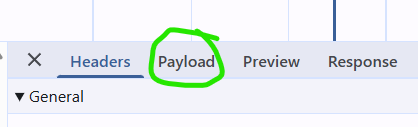
You can see the required parameters: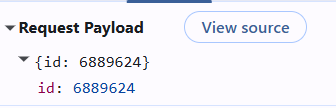
Then go to response. This is what you will get back from the API.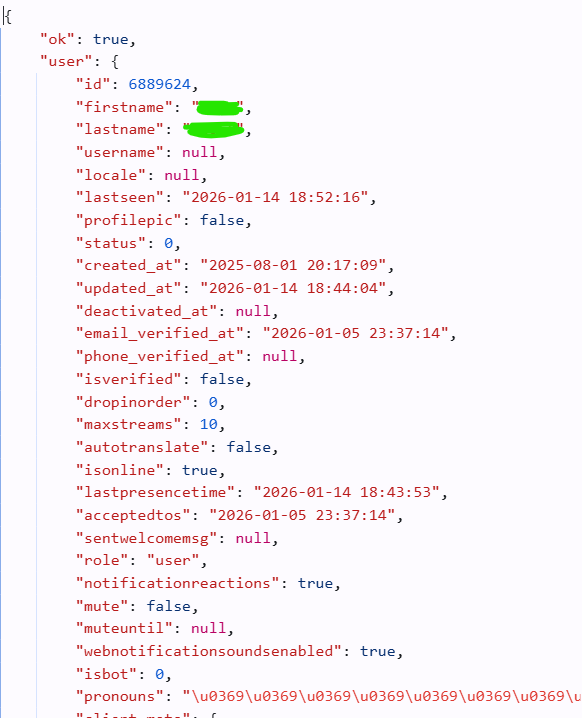
You can parse this with code:
def get_user(id_):
    result = make_cdp_request(
        'https://[pronto subdomain name here].pronto.io/api/v1/user.info',
        method='POST',
        headers={'Content-Type': 'application/json', 'Authorization': 'Bearer token'}, # Replace token with session token
        post_data=json.dumps({"id": id_})
    )["body"]
    result = json.loads(result)
    return result
get_user(user_id)["user"]["fullname"] # This gets the name of the userid